
cancel

QEC Software
86EVA

EtherCAT Graphical Configuration Tool
(86Duino IDE Integrated)

Specifications

  • Automatically scan EtherCAT MDevice / SubDevice network nodes

  • MDevice / SubDevice graphical parameter and I/O configuration

  • Real-time monitoring of device status

  • Automatically generate program code and import into IDE

Manual

Datasheet

Technical Resource


You can click here to download 《86EVA User Manual》for complete information.


Description


86EVA is a graphical EtherCAT configuration tool integrated into the 86Duino IDE.
It provides an intuitive interface that helps users quickly scan and configure EtherCAT MDevice and SubDevice, while automatically generating the corresponding network control code.
This significantly lowers the system setup barrier and improves development efficiency.
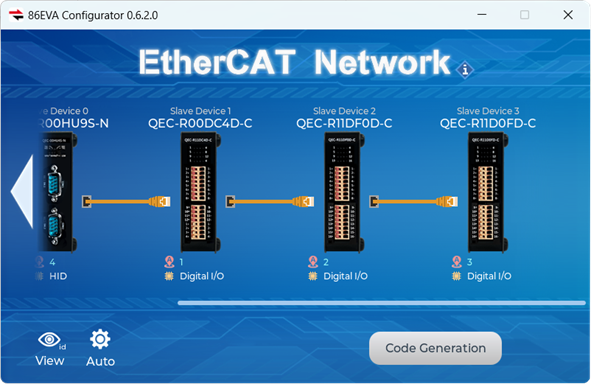
 

Key Features

 
  • EtherCAT Graphical Configuration Tool (Integrated into 86Duino IDE)
    A comprehensive graphical setup environment for both masters and slaves, simplifying system deployment.
  • EtherCAT Network Auto-Scan and Topology Visualization
    Automatically scans all master and slave nodes, displaying real-time network topology and connection status.
  • Code Auto-Generation and IDE Import
    One-click generation of control code and import into the 86Duino IDE accelerates system deployment.


Applications

 
  • Rapid EtherCAT System Deployment
    Ideal for projects requiring swift integration and debugging of multiple devices, significantly reducing implementation timelines and testing costs.
  • Multi-Axis Control and Automation Equipment Development
    Suitable for servo control, I/O module integration, and equipment automation projects, enhancing development efficiency and system stability.


86DuinoIDE


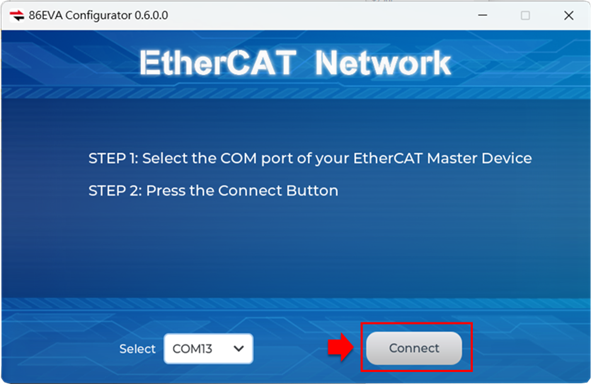
1. Launch 86EVA and select COM port to scan

After launching 86EVA, select the correct COM port and press “Connect” to begin scanning.
86DuinoIDE

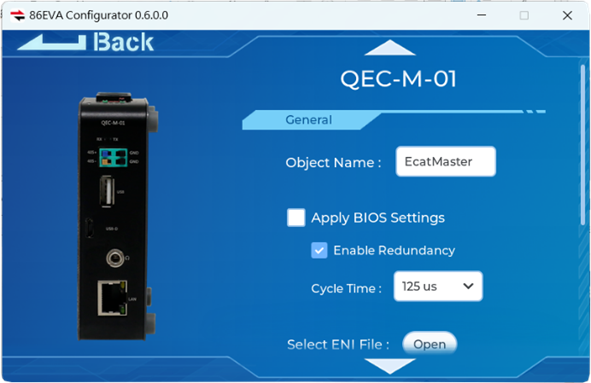
2. Personalized Settings for EtherCAT Devices

Click on the product image of an EtherCAT device to access its configuration page, where personalized settings can be applied
For example, you can set the object name, select the EtherCAT cycle time, choose redundancy options, and configure the ENI file.
86DuinoIDE

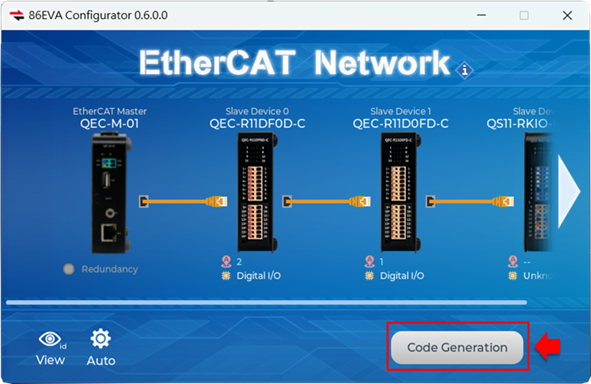
3. Generate Arduino Code and Complete Configuration in the IDE:

With one click in 86EVA, generate the Arduino code and system configuration files,
then upload them to the QEC MDevice via 86Duino IDE to quickly complete the system setup.

86DuinoIDE

For more detailed steps and advanced settings, please visit the QEC website: 86EVA, EtherCAT-Based Virtual Arduino for complete information.